



每次進去些店鋪看到人家的全屏輪播裝修是不是覺得很高端大氣上檔次,其實所有賣家都可以這樣裝修的。
下面的全屏輪播代碼可以兼容新旺鋪(系統自帶的三個模板,全部完美全屏居中)并且也支持老旺鋪拓展版,拓展版都會全屏居中。

輪播左右的兩個大箭頭,這次直接使用<>符號,非圖片形式,事實上寫此全屏輪播,我第一個改的就是這兩個大箭頭,比如自己店鋪的主色調是綠色,那箭頭就改為綠色。
下方的五個圖標,這次改為了五張小圖,因為我們自定義沒辦法實現 點擊箭頭左右切換時,下方的圖標也跟隨左右切換,這是需要用到判斷的,我沒辦法實現,所以改為五張小圖,是為了讓客戶知道到底有幾張圖在輪播,方便客戶查看,提高用戶體驗。同時,五張小圖直接浮動于大圖上方,底部采用半透明背景。
這里說下底部的半透明背景,這次編寫,最難的、也最耗時的地方就是這個半透明,支持CSS3的主流瀏覽器,只要一個opacity即可實現半透明,但IE卻是不支持這個屬性的,所以在IE下你將看到一條實心的黑色矩形,而不是半透明效果,在IE下想要實現半透明,那就要用到濾鏡,但請注意,淘寶不支持filter:alpha半透明濾鏡。為了解決這個問題,我花費了一上午的時間在查閱相關文檔,最后,我采用了一張PNG半透明圖片替代,放棄了opacity屬性和IE濾鏡,這樣除了IE6不支持半透明以處,其它瀏覽器都是正常半透明效果的。
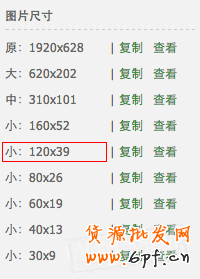
五張小圖的尺寸全部為:120px*39px,你不需要單獨做這五張小圖!把全屏大圖上傳圖片空間后,直接使用圖片空間提供的小圖尺寸即可,或者你也可以直接在原圖地址后面添加:_120120.jpg
此款全屏輪播,共寫了三個尺寸,分別為1920px,1680px,1440px,高度統一為550px,三款尺寸可以同時使用,互不影響,但不建議這樣做!這三個尺寸,沒有說哪個好哪個不好,只是說尺寸越大,兼容性就越好一些,但請注意,尺寸大了,圖片的容量也將會同時變大!圖片的容量大了,將會直接影響店鋪的載入速度。
如果你沒有五張全屏大圖那么多,或者你認為不需要五張,那直接刪除代碼中 圖片所在的<li>標簽即可。不管你使用幾張輪播圖,下面的小圖都是居中的。
使用說明:
1.下載這張底部半透明圖片(  )上傳自己的圖片空間,替換下面代碼中的”http://demo.taobaoux.com/Carousel/Carousel_bg.png“
2.如何將代碼中的大圖改為自己的圖片,找到下面這段代碼:
<ul class="taobaoux-com" style="height:550px;width:1920px;padding:0px;margin:0px;">
<li style="width:1920px;height:550px;padding:0px;margin:0px;">
<a target="_blank" href="店鋪地址" style="padding:0px;margin:0px;">
<img src="圖片地址" width="1920px" height="550px" border="0px"></a></li>
<li style="width:1920px;height:550px;padding:0px;margin:0px;">
<a target="_blank" href="店鋪地址" style="padding:0px;margin:0px;">
<img src="圖片地址" width="1920px" height="550px" border="0px"></a></li>
<li style="width:1920px;height:550px;padding:0px;margin:0px;">
<a target="_blank" href="店鋪地址" style="padding:0px;margin:0px;">
<img src="圖片地址" width="1920px" height="550px" border="0px"></a></li>
<li style="width:1920px;height:550px;padding:0px;margin:0px;">
<a target="_blank" href="店鋪地址" style="padding:0px;margin:0px;">
<img src="圖片地址" width="1920px" height="550px" border="0px"></a></li>
<li style="width:1920px;height:550px;padding:0px;margin:0px;">
<a target="_blank" href="店鋪地址" style="padding:0px;margin:0px;">
<img src="圖片地址" width="1920px" height="550px" border="0px"></a></li>
</ul>
代碼中總共有五張大圖,按順序依次替換,src=""里面的就是圖片地址,href="" 里面的就是對應的寶貝鏈接。
3.如何將代碼中的小圖改為自己的圖片,找到下面這段代碼:
<ul class="bbs-taobaoux-com" style="width:950px;height:50px;margin:0 auto;text-align: center;">
<li style="display: inline;margin: 0 5px;cursor:pointer;line-height: 50px;">
<img src="圖片地址" width="120px" height="39px" border="0px" style="vertical-align:middle;margin:5px 0;" /></li>
<li style="display: inline;margin: 0 5px;cursor:pointer;line-height: 50px;">
<img src="圖片地址" width="120px" height="39px" border="0px" style="vertical-align:middle;margin:5px 0;" /></li>
<li style="display: inline;margin: 0 5px;cursor:pointer;line-height: 50px;">
<img src="圖片地址" width="120px" height="39px" border="0px" style="vertical-align:middle;margin:5px 0;" /></li>
<li style="display: inline;margin: 0 5px;cursor:pointer;line-height: 50px;">
<img src="圖片地址" width="120px" height="39px" border="0px" style="vertical-align:middle;margin:5px 0;" /></li>
<li style="display: inline;margin: 0 5px;cursor:pointer;line-height: 50px;">
<img src="圖片地址" width="120px" height="39px" border="0px" style="vertical-align:middle;margin:5px 0;" /></li>
</ul>
代碼中總共有五張小圖,按順序依次替換,src=""里面的就是圖片地址,href="" 里面的就是對應的寶貝鏈接。
注:為了方便大家使用,代碼中的圖片全部存放于本站,大家可以直接到自己的店鋪中測試(成人類目除外),測試通過后,再修改其中的圖片地址和鏈接地址即可。
1920px 全屏輪播代碼:(點擊下面的”“即可全部復制)
<div class="J_TWidget" data-widget-config="{effect: fade, circular: true ,contentCls:taobaoux}" data-widget-type="Tabs" style="height:545px;overflow:hidden;">
<div class="taobaoux" style="height:550px;">
<div class="footer-more-trigger" style="width:1920px;height:550px;top:auto;padding:0px;border:none;left:50%;">
<div class="footer-more-trigger" style="width:1920px;height:550px;padding:0px;border:none;left:-960px;">
<div data-widget-config="{contentCls: taobaoux-com,navCls: bbs-taobaoux-com,effect: scrollx,easing: easeOutStrong,prevBtnCls:prev1920,nextBtnCls:next1920,autoplay: true,viewSize:[1920],circular: true}" data-widget-type="Carousel" class="J_TWidget">
<div class="J_TWidget" data-widget-config="{trigger:.ux1920,align:{node:.ux1920,offset:[-500,0],points:[cc,cc]}}" data-widget-type="Popup" style="display:none;">
<div class="prev1920" style="font-size:100px;cursor:pointer;opacity:0.5;color:#f00;"><</div>
</div>
<div class="J_TWidget" data-widget-config="{trigger:.ux1920,align:{node:.ux1920,offset:[500,0],points:[cc,cc]}}" data-widget-type="Popup" style="display:none;">
<div class="next1920" style="font-size:100px;cursor:pointer;opacity:0.5;color:#f00;">></div>
</div>
<div style="height:550px;width:1920px;overflow:hidden;padding:0px;margin:0px;" class="ux1920">
<ul class="taobaoux-com" style="height:550px;width:1920px;padding:0px;margin:0px;">
<li style="width:1920px;height:550px;padding:0px;margin:0px;">
<a target="_blank" href="店鋪地址" style="padding:0px;margin:0px;">
<img src="圖片地址" width="1920px" height="550px" border="0px"></a></li>
<li style="width:1920px;height:550px;padding:0px;margin:0px;">
<a target="_blank" href="店鋪地址" style="padding:0px;margin:0px;">
<img src="圖片地址" width="1920px" height="550px" border="0px"></a></li>
<li style="width:1920px;height:550px;padding:0px;margin:0px;">
<a target="_blank" href="店鋪地址" style="padding:0px;margin:0px;">
<img src="圖片地址" width="1920px" height="550px" border="0px"></a></li>
<li style="width:1920px;height:550px;padding:0px;margin:0px;">
<a target="_blank" href="店鋪地址" style="padding:0px;margin:0px;">
<img src="圖片地址" width="1920px" height="550px" border="0px"></a></li>
<li style="width:1920px;height:550px;padding:0px;margin:0px;">
<a target="_blank" href="店鋪地址" style="padding:0px;margin:0px;">
<img src="圖片地址" width="1920px" height="550px" border="0px"></a></li>
</ul>
</div>
<div class="footer-more-trigger" style="padding:0px;border:none;left:50%;">
<div class="footer-more-trigger" style="width:1920px;height:50px;padding:0px;border:none;left:-960px;background: url(http://demo.taobaoux.com/Carousel/Carousel_bg.png) repeat;top:505px;">
<ul class="bbs-taobaoux-com" style="width:950px;height:50px;margin:0 auto;text-align: center;">
<li style="display: inline;margin: 0 5px;cursor:pointer;line-height: 50px;">
<img src="圖片地址" width="120px" height="39px" border="0px" style="vertical-align:middle;margin:5px 0;" /></li>
<li style="display: inline;margin: 0 5px;cursor:pointer;line-height: 50px;">
<img src="圖片地址" width="120px" height="39px" border="0px" style="vertical-align:middle;margin:5px 0;" /></li>
<li style="display: inline;margin: 0 5px;cursor:pointer;line-height: 50px;">
<img src="圖片地址" width="120px" height="39px" border="0px" style="vertical-align:middle;margin:5px 0;" /></li>
<li style="display: inline;margin: 0 5px;cursor:pointer;line-height: 50px;">
<img src="圖片地址" width="120px" height="39px" border="0px" style="vertical-align:middle;margin:5px 0;" /></li>
<li style="display: inline;margin: 0 5px;cursor:pointer;line-height: 50px;">
<img src="圖片地址" width="120px" height="39px" border="0px" style="vertical-align:middle;margin:5px 0;" /></li>
</ul>
</div>
</div>
</div>
</div>
</div>
</div>
<ul class="ks-switchable-nav" style="display:none;"></ul>
</div>
1680px 全屏輪播代碼:
<div class="J_TWidget" data-widget-config="{effect: fade, circular: true ,contentCls:taobaoux}" data-widget-type="Tabs" style="height:545px;overflow:hidden;">
<div class="taobaoux" style="height:550px;">
<div class="footer-more-trigger" style="width:1680px;height:550px;top:auto;padding:0px;border:none;left:50%;">
<div class="footer-more-trigger" style="width:1680px;height:550px;padding:0px;border:none;left:-840px;">
<div data-widget-config="{contentCls: taobaoux-com,navCls: bbs-taobaoux-com,effect: scrollx,easing: easeOutStrong,prevBtnCls:prev1680,nextBtnCls:next1680,autoplay: true,viewSize:[1680],circular: true}" data-widget-type="Carousel" class="J_TWidget">
<div class="J_TWidget" data-widget-config="{trigger:.ux1680,align:{node:.ux1680,offset:[-500,0],points:[cc,cc]}}" data-widget-type="Popup" style="display:none;">
<div class="prev1680" style="font-size:100px;cursor:pointer;opacity:0.5;color:#f00;"><</div>
</div>
<div class="J_TWidget" data-widget-config="{trigger:.ux1680,align:{node:.ux1680,offset:[500,0],points:[cc,cc]}}" data-widget-type="Popup" style="display:none;">
<div class="next1680" style="font-size:100px;cursor:pointer;opacity:0.5;color:#f00;">></div>
</div>
<div style="height:550px;width:1680px;overflow:hidden;padding:0px;margin:0px;" class="ux1680">
<ul class="taobaoux-com" style="height:550px;width:1680px;padding:0px;margin:0px;">
<li style="width:1680px;height:550px;padding:0px;margin:0px;">
<a target="_blank" href="店鋪地址" style="padding:0px;margin:0px;">
<img src="圖片地址" width="1680px" height="550px" border="0px"></a></li>
<li style="width:1680px;height:550px;padding:0px;margin:0px;">
<a target="_blank" href="店鋪地址" style="padding:0px;margin:0px;">
<img src="圖片地址" width="1680px" height="550px" border="0px"></a></li>
<li style="width:1680px;height:550px;padding:0px;margin:0px;">
<a target="_blank" href="店鋪地址" style="padding:0px;margin:0px;">
<img src="圖片地址" width="1680px" height="550px" border="0px"></a></li>
<li style="width:1680px;height:550px;padding:0px;margin:0px;">
<a target="_blank" href="店鋪地址" style="padding:0px;margin:0px;">
<img src="圖片地址" width="1680px" height="550px" border="0px"></a></li>
<li style="width:1680px;height:550px;padding:0px;margin:0px;">
<a target="_blank" href="店鋪地址" style="padding:0px;margin:0px;">
<img src="圖片地址" width="1680px" height="550px" border="0px"></a></li>
</ul>
</div>
<div class="footer-more-trigger" style="padding:0px;border:none;left:50%;">
<div class="footer-more-trigger" style="width:1680px;height:50px;padding:0px;border:none;left:-840px;background: url(http://demo.taobaoux.com/Carousel/Carousel_bg.png) repeat;top:505px;">
<ul class="bbs-taobaoux-com" style="width:950px;height:50px;margin:0 auto;text-align: center;">
<li style="display: inline;margin: 0 5px;cursor:pointer;line-height: 50px;">
<img src="http://demo.taobaoux.com/Carousel/1680/1680*550_1.jpg" width="120px" height="39px" border="0px" style="vertical-align:middle;margin:5px 0;" /></li>
<li style="display: inline;margin: 0 5px;cursor:pointer;line-height: 50px;">
<img src="http://demo.taobaoux.com/Carousel/1680/1680*550_2.jpg" width="120px" height="39px" border="0px" style="vertical-align:middle;margin:5px 0;" /></li>
<li style="display: inline;margin: 0 5px;cursor:pointer;line-height: 50px;">
<img src="http://demo.taobaoux.com/Carousel/1680/1680*550_3.jpg" width="120px" height="39px" border="0px" style="vertical-align:middle;margin:5px 0;" /></li>
<li style="display: inline;margin: 0 5px;cursor:pointer;line-height: 50px;">
<img src="http://demo.taobaoux.com/Carousel/1680/1680*550_4.jpg" width="120px" height="39px" border="0px" style="vertical-align:middle;margin:5px 0;" /></li>
<li style="display: inline;margin: 0 5px;cursor:pointer;line-height: 50px;">
<img src="http://demo.taobaoux.com/Carousel/1680/1680*550_5.jpg" width="120px" height="39px" border="0px" style="vertical-align:middle;margin:5px 0;" /></li>
</ul>
</div>
</div>
</div>
</div>
</div>
</div>
<ul class="ks-switchable-nav" style="display:none;"></ul>
</div>
1440px 全屏輪播代碼:
<div class="J_TWidget" data-widget-config="{effect: fade, circular: true ,contentCls:taobaoux}" data-widget-type="Tabs" style="height:545px;overflow:hidden;">
<div class="taobaoux" style="height:550px;">
<div class="footer-more-trigger" style="width:1440px;height:550px;top:auto;padding:0px;border:none;left:50%;">
<div class="footer-more-trigger" style="width:1440px;height:550px;padding:0px;border:none;left:-720px;">
<div data-widget-config="{contentCls: taobaoux-com,navCls: bbs-taobaoux-com,effect: scrollx,easing: easeOutStrong,prevBtnCls:prev1440,nextBtnCls:next1440,autoplay: true,viewSize:[1440],circular: true}" data-widget-type="Carousel" class="J_TWidget">
<div class="J_TWidget" data-widget-config="{trigger:.ux1440,align:{node:.ux1440,offset:[-500,0],points:[cc,cc]}}" data-widget-type="Popup" style="display:none;">
<div class="prev1440" style="font-size:100px;cursor:pointer;opacity:0.5;color:#f00;"><</div>
</div>
<div class="J_TWidget" data-widget-config="{trigger:.ux1440,align:{node:.ux1440,offset:[500,0],points:[cc,cc]}}" data-widget-type="Popup" style="display:none;">
<div class="next1440" style="font-size:100px;cursor:pointer;opacity:0.5;color:#f00;">></div>
</div>
<div style="height:550px;width:1440px;overflow:hidden;padding:0px;margin:0px;" class="ux1440">
<ul class="taobaoux-com" style="height:550px;width:1440px;padding:0px;margin:0px;">
<li style="width:1440px;height:550px;padding:0px;margin:0px;">
<a target="_blank" href="店鋪地址" style="padding:0px;margin:0px;">
<img src="http://demo.taobaoux.com/Carousel/1440/1440*550_1.jpg" width="1440px" height="550px" border="0px"></a></li>
<li style="width:1440px;height:550px;padding:0px;margin:0px;">
<a target="_blank" href="店鋪地址" style="padding:0px;margin:0px;">
<img src="http://demo.taobaoux.com/Carousel/1440/1440*550_2.jpg" width="1440px" height="550px" border="0px"></a></li>
<li style="width:1440px;height:550px;padding:0px;margin:0px;">
<a target="_blank" href="店鋪地址" style="padding:0px;margin:0px;">
<img src="http://demo.taobaoux.com/Carousel/1440/1440*550_3.jpg" width="1440px" height="550px" border="0px"></a></li>
</ul>
</div>
<div class="footer-more-trigger" style="padding:0px;border:none;left:50%;">
<div class="footer-more-trigger" style="width:1440px;height:50px;padding:0px;border:none;left:-720px;background: url(http://demo.taobaoux.com/Carousel/Carousel_bg.png) repeat;top:505px;">
<ul class="bbs-taobaoux-com" style="width:950px;height:50px;margin:0 auto;text-align: center;">
<li style="display: inline;margin: 0 5px;cursor:pointer;line-height: 50px;">
<img src="http://demo.taobaoux.com/Carousel/1440/1440*550_1.jpg" width="120px" height="39px" border="0px" style="vertical-align:middle;margin:5px 0;" /></li>
<li style="display: inline;margin: 0 5px;cursor:pointer;line-height: 50px;">
<img src="http://demo.taobaoux.com/Carousel/1440/1440*550_2.jpg" width="120px" height="39px" border="0px" style="vertical-align:middle;margin:5px 0;" /></li>
<li style="display: inline;margin: 0 5px;cursor:pointer;line-height: 50px;">
<img src="http://demo.taobaoux.com/Carousel/1440/1440*550_3.jpg" width="120px" height="39px" border="0px" style="vertical-align:middle;margin:5px 0;" /></li>
</ul>
</div>
</div>
</div>
</div>
</div>
</div>
<ul class="ks-switchable-nav" style="display:none;"></ul>
</div>
注:如果你想把此全屏輪播做的更加個性,那就請認真看完以下內容吧。
1.修改左箭頭:
<div class="prev1920" style="font-size:100px;cursor:pointer;opacity:0.5;color:#f00;"><</div>
修改為:
<div class="prev1920" style="width:97px;height:97px;">
<img src="左箭頭圖片地址" />
</div>
2.修改右箭頭:
<div class="next1920" style="font-size:100px;cursor:pointer;opacity:0.5;color:#f00;">></div>
修改為:
<div class="next1920" style="width:97px;height:97px;">
<img src="右箭頭圖片地址" />
</div>
這里箭頭尺寸是97px*97px,如果你的圖片不是這個尺寸,請自行修改。
3.箭頭都放在左邊:
<div class="J_TWidget" data-widget-config="{trigger:.ux1920,align:{node:.ux1920,offset:[-500,0],points:[cc,cc]}}" data-widget-type="Popup" style="display:none;">
<div class="prev1920" style="font-size:100px;cursor:pointer;opacity:0.5;color:#f00;"><</div>
</div>
<div class="J_TWidget" data-widget-config="{trigger:.ux1920,align:{node:.ux1920,offset:[500,0],points:[cc,cc]}}" data-widget-type="Popup" style="display:none;">
<div class="next1920" style="font-size:100px;cursor:pointer;opacity:0.5;color:#f00;">></div>
</div>
修改為:
<div class="J_TWidget" data-widget-config="{trigger:.ux1920,align:{node:.ux1920,offset:[-500,0],points:[cc,cc]}}" data-widget-type="Popup" style="display:none;">
<div class="prev1920" style="width:97px;height:97px;margin-left: 97px;">
<img src="左箭頭圖片地址" /></div>
<div class="next1920" style="width:97px;height:97px;">
<img src="右箭頭圖片地址" /></div>
</div>
4.下方的縮略圖改為數字:
<div class="footer-more-trigger" style="width:1920px;height:50px;padding:0px;border:none;left:-960px;background: url(http://demo.taobaoux.com/Carousel/Carousel_bg.png) repeat;top:505px;">
<ul class="bbs-taobaoux-com" style="width:950px;height:50px;margin:0 auto;text-align: center;">
<li style="display: inline;margin: 0 5px;cursor:pointer;line-height: 50px;">
<img src="http://demo.taobaoux.com/Carousel/1920/1920.jpg" width="120px" height="39px" border="0px" style="vertical-align:middle;margin:5px 0;" /></li>
<li style="display: inline;margin: 0 5px;cursor:pointer;line-height: 50px;">
<img src="http://demo.taobaoux.com/Carousel/1920/1920_2.jpg" width="120px" height="39px" border="0px" style="vertical-align:middle;margin:5px 0;" /></li>
<li style="display: inline;margin: 0 5px;cursor:pointer;line-height: 50px;">
<img src="http://demo.taobaoux.com/Carousel/1920/1920_3.jpg" width="120px" height="39px" border="0px" style="vertical-align:middle;margin:5px 0;" /></li>
<li style="display: inline;margin: 0 5px;cursor:pointer;line-height: 50px;">
<img src="http://demo.taobaoux.com/Carousel/1920/1920_2.jpg" width="120px" height="39px" border="0px" style="vertical-align:middle;margin:5px 0;" /></li>
<li style="display: inline;margin: 0 5px;cursor:pointer;line-height: 50px;">
<img src="http://demo.taobaoux.com/Carousel/1920/1920_3.jpg" width="120px" height="39px" border="0px" style="vertical-align:middle;margin:5px 0;" /></li>
</ul>
</div>
修改為:
<div class="footer-more-trigger" style="width:1920px;height:30px;padding:0px;border:none;left:-960px;background: url(http://demo.taobaoux.com/Carousel/Carousel_bg.png) repeat;top:525px;">
<ul class="bbs-taobaoux-com" style="width:950px;height:30px;margin:0 auto;text-align: center;">
<li style="display: inline;margin: 0 5px;padding: 5px;opacity: 0.5;cursor:pointer;color:#000;background:#fff;line-height:30px;">1</li>
<li style="display: inline;margin: 0 5px;padding: 5px;opacity: 0.5;cursor:pointer;color:#000;background:#fff;line-height:30px;">2</li>
<li style="display: inline;margin: 0 5px;padding: 5px;opacity: 0.5;cursor:pointer;color:#000;background:#fff;line-height:30px;">3</li>
<li style="display: inline;margin: 0 5px;padding: 5px;opacity: 0.5;cursor:pointer;color:#000;background:#fff;line-height:30px;">4</li>
<li style="display: inline;margin: 0 5px;padding: 5px;opacity: 0.5;cursor:pointer;color:#000;background:#fff;line-height:30px;">5</li>
</ul>
</div>
5.不喜歡底部的半透明圖片?
找到下面這段代碼:
<div class="footer-more-trigger" style="width:1920px;height:50px;padding:0px;border:none;left:-960px;background: url(http://demo.taobaoux.com/Carousel/Carousel_bg.png) repeat;top:505px;">
刪除
background: url(http://demo.taobaoux.com/Carousel/Carousel_bg.png) repeat;
6.修改滾動動畫效果:
找到effect: scrollx 把scrollx改為scrolly就是垂直滾動,改為fade就是淡隱淡現。
7.修改滾動動畫速度:
在effect: scrollx,后面添加一個屬性 duration:0.5,
默認值就是0.5,如果需要加快滾動速度,把0.5改為0.1;需要滾動速度慢一點,就把0.5加大,建議改為0.9以內。
樂發網超市批發網提供超市貨源信息,超市采購進貨渠道。超市進貨網提供成都食品批發,日用百貨批發信息、微信淘寶網店超市采購信息和超市加盟信息.打造國內超市采購商與批發市場供應廠商搭建網上批發市場平臺,是全國批發市場行業中電子商務權威性網站。
本文來源: 2014全屏輪播海報制作教程-簡單易懂